Lost Your Receipt? Here's How to Get a Replacement Fast
If you’ve lost your receipt, don’t worry - there are simple ways to replace it. Receipts are important for returns, warranties, tax deductions, and reimbursements, but losing them is common (70% of people misplace at least one annually). Here's how to recover or recreate one quickly:
- Contact the Store: Many retailers can reprint receipts if you provide details like the purchase date, payment method, and store location. Policies vary, and some stores only retain records for 30–90 days.
- Check Digital Records: Search your email for purchase confirmations or review bank/credit card statements for transaction details. Retailer apps may also store itemized purchase histories.
- Use Receipt Generator: When other options fail, tools like Receipt Generator let you create replacement receipts using customizable templates for over 200 stores. You can edit details like date, items, and totals, then download a PDF or PNG.
Each method has its uses: contacting the store works for official returns, digital records provide proof of purchase, and Receipt Generator offers a fast alternative when time is tight.
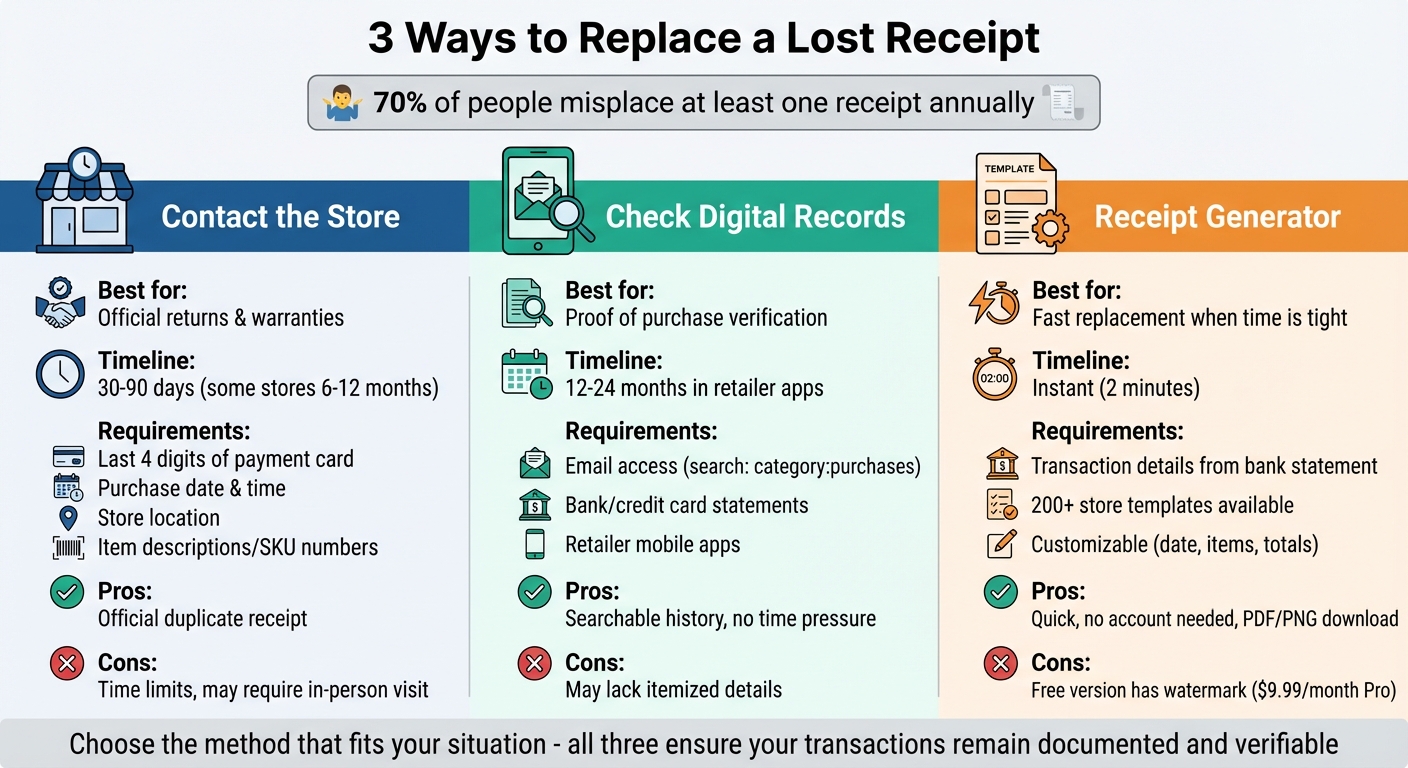
3 Methods to Replace Lost Receipts: Comparison Guide
Contact the Store for a Duplicate Receipt
Your first step is to reach out to the store. Most retailers can locate your transaction through their POS system and provide a duplicate receipt. You can do this by visiting the store, calling, using live chat, or submitting an online request. If you're in a hurry, an in-person visit is usually the quickest option, as store associates can print the receipt on the spot. Before contacting the store, take a moment to check their reprint policies to understand any specific requirements or time limits.
Review Store Reprint Policies
Reprint policies can vary widely between retailers. Most stores keep transaction records for 30 to 90 days, but some retain records for up to 6 to 12 months, especially for high-value purchases. Membership-based retailers like Costco and Sam's Club make tracking purchases easier through membership agreements. For example, Office Depot allows Rewards Program members to access receipts online, while non-members may need to submit a request and wait up to 48 hours.
Gather Required Transaction Information
Before reaching out, collect important transaction details. This includes the last four digits of the payment card, the approximate date and time of purchase, the store location, and any item descriptions or SKU numbers. If you have loyalty program information, such as a phone number or rewards ID, it can speed up the process. A government-issued ID may also be required to verify your identity. The more details you provide, the easier it will be for the store to locate your receipt.
Know When Stores Cannot Reprint Receipts
There are situations where reprinting a receipt may not be possible. For example, cash transactions without a rewards account or digital record may not be recoverable. Additionally, if the purchase falls outside the typical 90-day record-keeping window, the transaction may have been purged. If a reprint isn't an option, you can use a bank statement as proof of purchase, request a no-receipt return for store credit, or, in the case of electronics, check if the manufacturer can confirm warranty details using the product's serial number.
sbb-itb-2232899
Use Receipt Generator to Create a Replacement Receipt
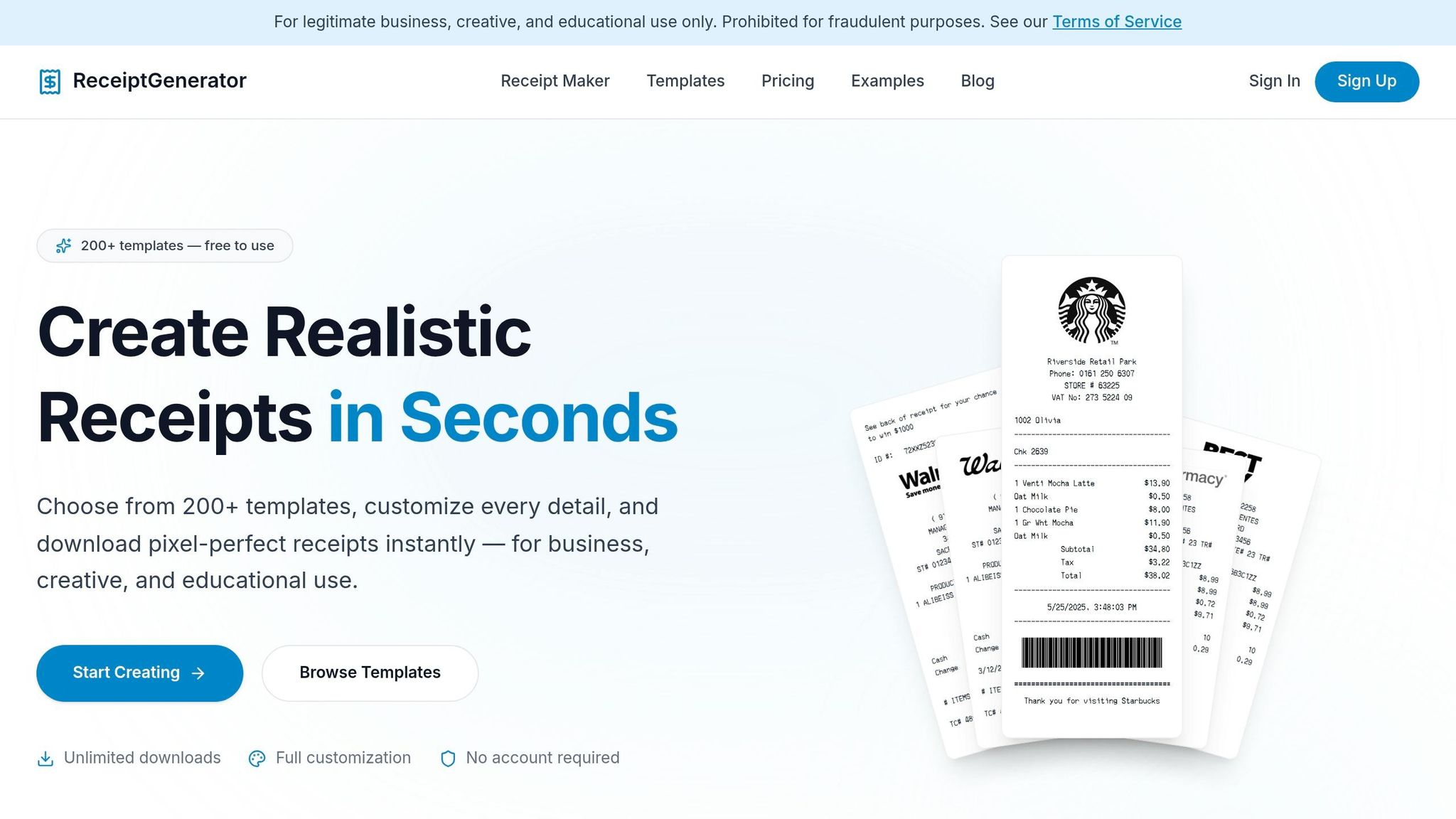
When getting a reprint from the store isn't an option, Receipt Generator becomes your go-to solution. This online tool offers a quick and easy way to recreate a lost receipt without requiring downloads or account registration. With access to over 200 customizable templates, you can effortlessly generate receipts for returns, warranties, or personal records. Let’s dive into how it works.
Browse 200+ Store Templates
Receipt Generator provides templates for many well-known U.S. retailers, including Walmart, Target, Starbucks, Best Buy, CVS, Costco, and Apple Store. These templates are designed to mirror the exact layout and style of real store receipts. From authentic thermal fonts to realistic printing effects, the details are spot-on. All you need to do is scroll through the template library, pick the retailer relevant to your purchase, and start customizing. Plus, it works seamlessly on any device.
Edit Receipt Details to Match Your Purchase
Once you’ve chosen a template, you can modify every detail to reflect your original receipt. Adjust the store name, address, phone number, and store number to match the location where you shopped. Enter transaction details like the purchase date (formatted as MM/DD/YYYY), time, and register number. For the items, you can input product names, quantities, and prices - totals and taxes are calculated automatically. You can even include payment details, such as the last four digits of a card or cash/EBT options. A live preview updates in real time, so you can ensure everything looks perfect before moving forward.
Download and Use Your Receipt
After finalizing the details, you can download your receipt as a high-resolution PNG for digital purposes or as a PDF for printing and expense submissions. To make it look even more realistic, you can apply options like thermal paper textures or faded text effects. The free version includes a watermark, but upgrading to the Pro subscription ($9.99/month or $69.99/year) removes it and unlocks unlimited access to all features.
"The best free receipt maker I've ever used. I needed to make a receipt for a client reimbursement and it took me under a minute. The receipt templates look incredibly professional and realistic." - Sarah M., Freelance Designer
Check Email and Bank Records for Digital Receipts
If reprinting a receipt isn’t an option, your digital records might already have the information you need. Many retailers send email confirmations within minutes of a purchase, and your bank or credit card statements can offer transaction details to help you track down a lost receipt. Surprisingly, many people overlook these resources, even though they often contain proof of purchase.
Search Your Email for Purchase Confirmations
For Gmail users, finding purchase-related emails is easier than you might think. Gmail automatically assigns an internal "purchases" label to emails related to transactions. To access these, simply type category:purchases into Gmail’s search bar. This will pull up receipts, invoices, and order confirmations in one place.
As Google Developer Expert Amit Agarwal points out:
"Gmail, internally, assigns a category 'purchases' to all emails that are related to purchases. This includes receipts, invoices, purchase history, credit card statements, digital downloads and other related emails."
You can refine your search further with specific filters. For instance:
- Use
category:purchases from:walmart.comto find receipts from Walmart. - Specify a date range with
after:2025/01/01 before:2025/06/30. - Look for PDF receipts by typing
category:purchases has:attachment. If you only have a digital copy but need a physical look, you can use a receipt photo generator to place the data into a realistic setting.
Don’t forget to check your spam and promotional folders - automated receipts often get filtered there.
Review Bank and Credit Card Transactions
If your email search doesn’t work, your bank or credit card statement can be a reliable backup. These records include the merchant name, transaction date, and total amount paid - details that store associates can use to locate your purchase in their system.
Many retailers keep transaction records for 30–90 days, but some extend this to 6–12 months for expensive items. To request a duplicate receipt, gather key details like the last four digits of the card used, the approximate purchase date, and the store location from your statement.
Additionally, major retailers like Target, Walmart, and Best Buy often store itemized purchase histories in their mobile apps for 12–24 months. These apps can be a quick and efficient way to retrieve transaction details if you need to contact the store for assistance.
How to Create Accurate Replacement Receipts
When it comes to replacement receipts, precision is everything. Whether you're handling tax documentation, requesting reimbursement, or making warranty claims, every detail must align perfectly with the original transaction. Getting it right the first time saves you from denied claims or tax headaches.
Use Correct US Formatting
Receipts in the US follow specific formatting standards that make them both recognizable and acceptable for official purposes. Start with the basics:
- Date format: Always use MM/DD/YYYY (e.g., 03/28/2026, not 28/03/2026).
- Currency display: Place the dollar sign ($) before the amount, using a period as the decimal separator (e.g., $75.30).
- Sales tax: Include it as a separate line item below the subtotal. If you’re unsure of the exact amount, check your local sales tax rate to ensure accuracy.
The subtotal plus tax should match the total shown on your bank or credit card statement. Any mismatch could raise questions during audits or claims reviews. Additionally, assign a unique receipt number (e.g., 20260328-001) to make tracking easier. Once formatted, double-check the receipt against your transaction records to confirm all details.
Double-Check Details for Accuracy
Certified Accountant Kellan A. Pilot emphasizes the importance of accuracy, stating:
"A valid receipt creates an unbroken chain of evidence between a buyer and a transaction. Without those core elements - date, vendor, amount, and description - you're essentially holding a piece of paper that proves nothing."
For business expenses, the IRS typically requires physical receipts for transactions of $75 or more. Lodging expenses always need a receipt, regardless of the amount.
To ensure your replacement receipt is valid, cross-check it with your bank or credit card statement. Confirm the merchant name, transaction date, and total amount charged. Verify every detail, including tax calculations and dates, and for business-related expenses, include notes about the purpose or relevant project codes. This level of diligence helps maintain a clear and reliable record.
Conclusion
Misplacing a receipt doesn't have to throw off your returns, reimbursements, or tax records. You now have three practical ways to retrieve your proof of purchase: reach out to the store for a duplicate, search through your email and bank statements for digital records, or quickly create a replacement using Receipt Generator.
Each option has its strengths. Store lookups are ideal for official returns and warranties, digital records provide a searchable history (typically covering 12–24 months), and Receipt Generator offers a fast, convenient fix for urgent situations. These methods ensure your transactions remain documented and verifiable for any purpose.
As Adam Rogers puts it:
"Lost receipts represent a solvable problem through systematic recovery efforts, appropriate use of digital receipt tools, and implementation of preventive documentation practices."
For the quickest solution, Receipt Generator stands out. With over 200 store templates and options to customize details like dates (MM/DD/YYYY format) and dollar sign placement, it offers a user-friendly way to recreate receipts. No account is needed, and you can download your replacement as a PDF or PNG in just two minutes.
FAQs
What info do I need to ask a store to reprint my receipt?
To get a store to reprint your receipt, make sure to provide essential details that will help them track down your transaction. These typically include:
- The purchase date
- The total amount paid
- The payment method (like credit card or rewards points)
It’s also a good idea to share your contact information so they can send you the reprinted receipt without delay. This makes the process smoother and ensures you get what you need quickly.
Can a bank statement work as proof of purchase?
Bank statements can often serve as proof of purchase, especially for smaller expenses under $75. They’re also a valid option for reconstructing expenses for tax purposes if the original receipts are missing.
Will a replacement receipt be accepted for taxes or reimbursements?
A replacement receipt can work for taxes or reimbursements as long as it meets certain standards. For reimbursements, it should include key details like the date of purchase, total amount, and the vendor's name. When it comes to tax deductions, especially under IRS rules, receipts are crucial for expenses over $75. They need to be precise and follow the guidelines. Having a detailed and credible replacement receipt improves the likelihood of it being accepted.