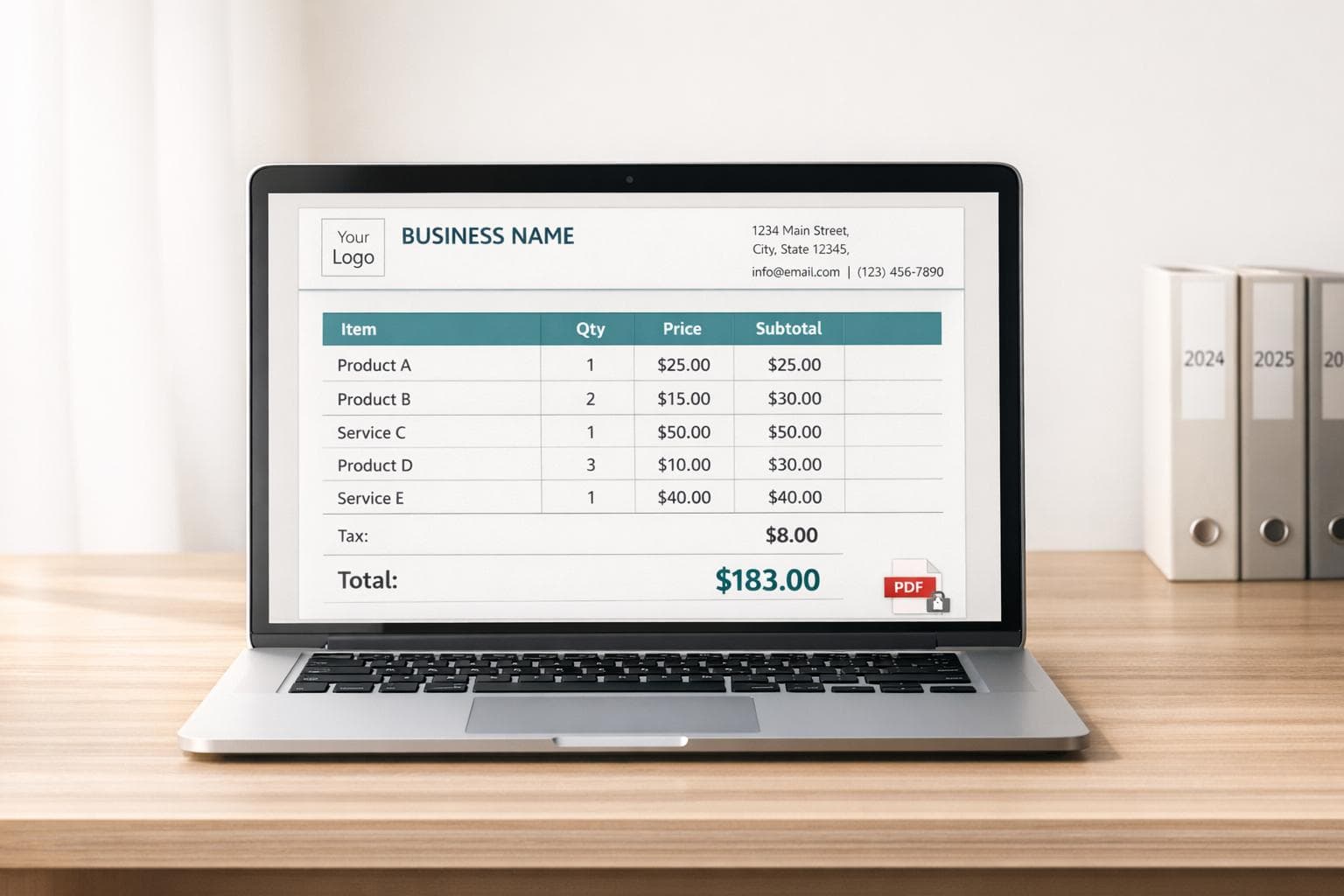
Digital Receipt Templates: What to Include
Digital receipts are more than just proof of purchase - they're tools for recordkeeping, customer engagement, and legal compliance. A well-designed digital receipt template includes:
- Business Information: Name, address, contact details, Tax ID, and a clear logo.
- Transaction Details: Unique receipt number, date/time in MM/DD/YYYY format, and store/cashier ID if applicable.
- Customer Information: Email for receipt delivery, and additional details like billing address or PO numbers for B2B transactions.
- Itemized Purchases: Detailed descriptions, quantities, unit prices, and totals for transparency.
- Discounts and Taxes: Clearly itemized adjustments and tax rates (e.g., Sales Tax 8.25%).
- Financial Summary: Subtotal, discounts, taxes, and a bold, distinct grand total.
- Payment and Delivery: Payment method (e.g., Visa ending in 4321), refund policies, and delivery options like email or SMS. For physical documentation without a printer, you can even generate realistic receipt photos for your records.
Key Compliance Tips:
- Follow US formatting standards: USD with two decimals, MM/DD/YYYY dates, and truncated card details per FACTA.
- Retain digital receipts for at least 3 years; 6–7 years is safer for extended audits.
- Use locked PDFs to preserve formatting and ensure legal reliability.
Digital receipts not only simplify transactions but also build trust with clear, organized details. By following these guidelines, you'll create professional, compliant templates that benefit both your business and customers.
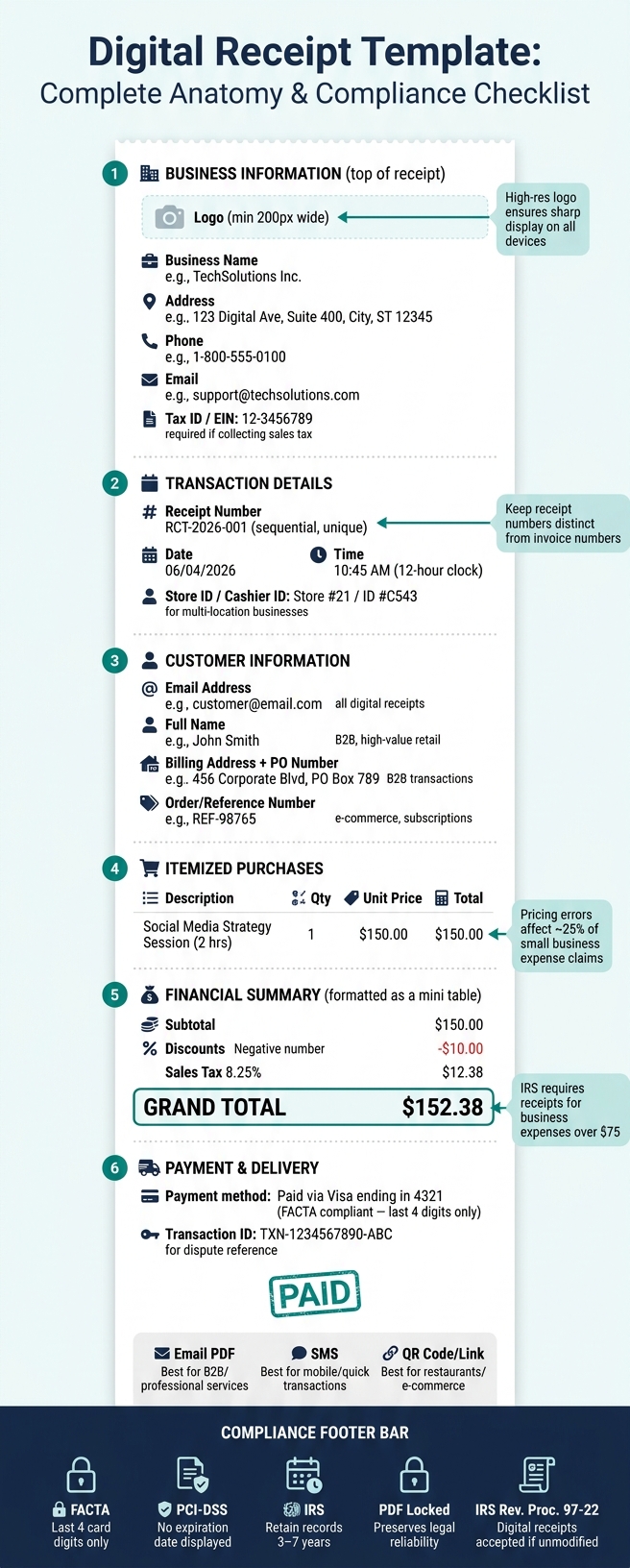
Digital Receipt Template: Complete Anatomy & Compliance Checklist
Core Elements of a Digital Receipt Template
A well-structured digital receipt should include comprehensive details about the business, transaction, and customer. These elements ensure clarity, professionalism, and ease of use for both the business and the customer.
Business Information
Start by including your business's essential details: name, address, phone number, and email. If your business collects sales tax, be sure to add your Tax ID (or EIN), as this is often required for customers to claim expenses.
To make the receipt visually appealing and easily identifiable, incorporate a high-resolution logo (at least 200 pixels wide) for sharp display across all devices.
"An effective receipt tells the complete story of a transaction. Each field, from the receipt number to the tax line, adds a crucial detail that prevents confusion and builds trust." - ReceiptGen Team
Once the business details are in place, it's time to focus on the transaction specifics for accurate recordkeeping.
Transaction Details
Every digital receipt should feature a unique, sequential receipt number. A format like RCT-2026-001 works well, as it avoids duplicates and makes it simple to locate a transaction during audits or refunds. Keep these numbers distinct from invoice numbers to prevent mix-ups.
The receipt should also include the exact date and time of the payment - this should reflect when the transaction occurred, not when the receipt was printed. Use the MM/DD/YYYY format (e.g., 06/04/2026) and a 12-hour clock with AM/PM for clarity, especially for U.S. customers. If your business operates multiple locations, adding a store or cashier ID can help streamline internal tracking.
Customer Information
While customer details aren't always necessary for retail transactions, they become crucial in certain cases. For example, in B2B sales, include the buyer's business name, billing address, and Purchase Order (PO) number to assist with their accounting processes. For high-value or subscription-based purchases, adding an order or reference number helps tie the receipt to a specific customer account.
For standard retail transactions, collecting the customer's email is highly recommended. It allows for digital delivery of the receipt using a free receipt maker, simplifies returns, and provides an opportunity to introduce loyalty programs.
Here’s a quick reference table to determine when specific customer details are most useful:
| Customer Field | Best Used For |
|---|---|
| Full Name | B2B, service-based, or high-value retail |
| Email Address | All digital receipts |
| Physical Address | B2B and large retail transactions |
| Tax ID / EIN | B2B transactions requiring expense documentation |
| PO Number | B2B accounting reconciliation |
| Order / Reference Number | E-commerce and subscription services |
These foundational details pave the way for a clear and organized breakdown of purchased items.
sbb-itb-2232899
Itemized Breakdown of Purchases
An itemized breakdown is more than just a list - it's a cornerstone of transparency, ensuring accurate pricing and compliance. It allows customers to verify their purchases and provides businesses with a reliable record for audits or resolving disputes. Combined with clear business and transaction details, this breakdown ensures every part of a purchase is accounted for.
Line Items and Pricing
Each line item should include four key details: a description, quantity, unit price, and the auto-calculated total. This setup minimizes errors, which affect roughly 25% of small business expense claims. Use precise descriptors like "Social Media Strategy Session (2 Hours)" instead of vague terms like "Services." Including SKUs on retail receipts can also simplify returns and inventory management.
"Clarity is essential for accurate bookkeeping, and a detailed, itemized list is your best tool for achieving clarity and protecting your business." - ReceiptGen
Discounts and Taxes
After listing prices, adjustments such as discounts and taxes should be clearly noted as separate line items. Discounts should appear as negative amounts (e.g., -$15.00), while taxes should include the exact rate (e.g., Sales Tax 8.25%). This separation is especially important given that nearly every U.S. state collects sales tax, with only five exceptions. Additional fees like shipping, handling, or service charges should also be itemized to avoid surprises in the total.
Subtotal, Tax, and Grand Total
The financial summary should follow this order: Subtotal → Discounts → Taxes → Grand Total. The subtotal represents the total cost of all line items before any adjustments. Discounts are then subtracted, taxes are added, and the grand total reflects the final amount paid. This structure is not just practical - it’s required by the IRS for business expenses of $75 or more.
Here’s how the summary should be formatted for maximum clarity:
| Financial Element | Formatting Best Practice | Purpose |
|---|---|---|
| Subtotal | Standard font, labeled | Shows the total before any deductions or taxes |
| Discounts | Negative number (e.g., -$10.00) | Highlights savings clearly |
| Tax | Separate line with rate (e.g., Sales Tax 8.25%) | Ensures compliance and transparency |
| Grand Total | Bold, larger font, visually distinct | Stands out as the final amount paid |
This structured approach not only improves clarity but also enhances the professionalism of the receipt.
Payment and Delivery Details
Once purchases are itemized, it’s important to clearly explain how payments were made and how receipts are delivered. This section ties everything together by detailing the payment method, refund and return policies, and how customers can access their digital receipts.
Payment Methods and Status
Every receipt should clearly state the payment method and transaction status. For instance, phrases like "Paid via Visa ending in 4321" or "Paid via PayPal" help customers match charges to their bank or payment statements. Including a unique transaction ID offers an easy reference point for disputes or audits, ensuring clarity and professionalism.
Payment statuses should be labeled explicitly, using terms like "Paid", "Paid in Full", "Partially Paid," or "Refunded." For digital receipts, adding a clear "PAID" stamp on PDFs can visually differentiate completed payments from unpaid invoices. When dealing with card payments, ensure compliance with US regulations like the Fair and Accurate Credit Transactions Act (FACTA), which limits the amount of card information displayed.
"In the United States, electronic and card payment receipts must comply with regulations such as the Fair and Accurate Credit Transactions Act (FACTA), which restricts how much card information can be displayed." - IONOS Editorial Team
Refund and return policies should also be reviewed to complete the payment process details.
Refunds and Return Policies
For returns, always issue a separate refund receipt instead of altering the original. The refund receipt should include the refunded amount, the original transaction ID, and specify whether the funds are being returned to the original payment method or issued as store credit. Including a note that bank processing may take 3–5 business days helps set realistic expectations. Additionally, provide a direct link to your full return policy for easy access.
Delivery and Access Options
Digital receipts are typically sent via email (as a PDF), SMS, or a downloadable link. Each method has its strengths. For example, email PDFs are ideal for professional services or B2B transactions since they create a permanent, unchangeable record. SMS works well for quick, mobile-first transactions, while QR codes can offer instant access to receipts, loyalty programs, or service links.
To avoid accidental edits, lock PDF formats whenever possible. Also, ensure all delivery methods meet US digital receipt standards, maintaining compliance and professionalism.
| Delivery Method | Best Use Case | Key Benefit |
|---|---|---|
| Email (PDF) | B2B, freelance, professional services | Permanent, unchangeable digital record |
| SMS/Messaging | Casual sales, small transactions | Quick and convenient for mobile-first users |
| QR Code/Link | Restaurants, e-commerce | Instant access to receipts and marketing resources |
Formatting and Compliance Best Practices
To wrap up your digital receipt, having a clear and compliant format is crucial. A well-organized receipt not only improves readability but also ensures audit reliability and meets legal requirements.
Layout and Readability
Your receipt should follow a logical order: start with business details at the top, include transaction metadata, provide an itemized list of purchases in the middle, and finish with a financial summary at the bottom. This structure makes it easy for customers to locate key information quickly.
For clarity, use clean sans-serif fonts like Arial or Open Sans in sizes between 10 and 12 points. Adding ample whitespace helps avoid a cluttered appearance. Since many customers view receipts on mobile devices, test your template on smaller screens to ensure readability. Studies indicate that customers spend an average of 4.2 seconds reading receipts, with 70% of their attention focused on the top and bottom thirds of the document. Make these areas count by placing the most important details there.
A well-organized layout not only enhances usability but also reflects a professional image of your brand.
Branding and Professionalism
Receipts are more than just transactional documents - they’re an opportunity to reinforce your brand. Display your logo prominently at the top and incorporate your brand colors in headers or dividers. Aligning the fonts and tone with your website and other customer touchpoints creates a seamless experience.
Don’t neglect the footer. Use this space for extras like a return policy, a thank-you message, social media links, or even a discount code for future purchases. These small details add a personal touch while maintaining a professional appearance.
Once your branding is in place, ensure every piece of data meets legal standards and accuracy requirements.
Data Accuracy and Legal Compliance
Beyond aesthetics, your receipt must comply with legal standards and maintain accuracy. Each receipt should have a unique, sequential number to simplify audits and prevent fraud. Clearly list subtotals, tax rates (e.g., "Sales Tax 8.25%"), and the grand total on separate lines for transparency.
For card payments, only display the last four digits of the card number and omit the expiration date, as required by PCI-DSS and FACTA regulations. To ensure the receipt remains unaltered, export it as a locked PDF. This preserves formatting and ensures the document is legally reliable. According to IRS Revenue Procedure 97-22, digital receipts are acceptable as long as they remain legible and unmodified. While the IRS generally requires records to be kept for 3 years, many tax professionals suggest retaining them for 6 to 7 years to cover extended audit periods. These steps build customer trust and ensure compliance with regulations.
| Receipt Element | Best Practice | Why It Matters |
|---|---|---|
| Receipt Number | Sequential (e.g., RCT-2026-001) | Prevents fraud; simplifies audits |
| Card Data | Last 4 digits only, no expiration date | PCI-DSS and FACTA compliance |
| Tax Line | Separate row with rate (e.g., "Sales Tax 8.25%") | Ensures transparency and IRS validation |
| File Format | PDF, locked for editing | Preserves formatting; ensures reliability |
| Retention Period | Minimum 3 years (IRS); 6–7 years recommended | Covers both standard and extended audits |
Creating Templates with Receipt Generator
Receipt Generator simplifies the process of building digital receipts by guiding you step-by-step through each essential element. Every field is customizable and aligns with the checklist we've discussed, ensuring your receipts meet US standards. This tool is designed to streamline the process while maintaining accuracy and professionalism.
Customization Features
With Receipt Generator, you can tailor every element to your needs. Add your business logo, name, and contact details. Assign receipt numbers, set transaction dates and times, and input item specifics. The tool even auto-calculates totals for you.
You can adjust tax rates, apply discounts, and specify payment methods. Include a footer with your return policy or a personalized message. Want a classic look? Opt for monospace fonts like Courier, perfect for thermal receipts. Once you're satisfied, you can export your receipt as a high-resolution PNG, ready for use.
AI Place in Scene Feature
Receipt Generator goes beyond basic customization with its AI Place in Scene feature. This tool allows you to create realistic photos of your receipt placed on various surfaces - a wooden desk, a marble countertop, or even next to a product. It's a handy feature for business owners needing mockups for product listings, social media, or client presentations. Plus, it eliminates the need for a physical receipt printer.
Why Use Receipt Generator
The platform offers access to over 400 templates inspired by real businesses like Walmart, Target, Starbucks, McDonald's, and Best Buy. These pre-designed templates save time and ensure compliance with professional standards. Whether you're recreating a lost receipt, designing one for your business, or crafting a mockup for a creative project, Receipt Generator has you covered.
No signup is required to get started. Free exports include a watermark, while the Pro plan removes it and unlocks additional features. This makes Receipt Generator a versatile tool for a wide range of needs, from replacing receipts to creating polished templates for any purpose.
Conclusion: Putting It All Together
Crafting a digital receipt template doesn't have to be overly complex. Each field serves a specific purpose. When key elements - like business details, itemized purchases, a clear tax breakdown, payment method, and a unique receipt number - come together smoothly, the result is more than just a receipt. It becomes a reliable tool for recordkeeping and an opportunity to strengthen your brand.
This structure ensures clarity and adherence to legal standards. Precision matters. Unlike thermal paper receipts that can fade within 6–24 months, digital receipts remain readable indefinitely, making them a better long-term option. Always list taxes as a separate line item. Including them within item prices can create challenges for customers managing their expenses and may conflict with state tax codes, such as those in Texas and California. Additionally, the IRS mandates receipts for business expenses over $75, and these records should be retained for at least three years - or up to seven years for more complex filings.
"A receipt is not just proof of purchase - it is the final handshake of a transaction, succinctly telling the entire story." - ReceiptGen
FAQs
What makes a digital receipt IRS-compliant?
To meet IRS requirements, a digital receipt must include key details: who, what, when, and how much. Specifically, this means listing the vendor's name, the purchase date, the total amount, a description of the goods or services, and the payment method used. For business-related expenses, an itemized breakdown is a must. Receipts should be clear, protected from tampering, and retained for at least three years. Receipt Generator provides customizable templates designed to meet these criteria.
What payment details can I safely show on a receipt?
When specifying payment methods on receipts, be clear about the type used - whether it's cash, credit card, check, or a digital transfer. For credit card transactions, ensure compliance with federal laws like FACTA. This means displaying no more than the last five digits of the card number and leaving out the expiration date entirely.
For cash payments, include details such as the amount tendered and the change given. Tools like Receipt Generator make it simple to customize these fields to suit your needs, ensuring accuracy and clarity in your receipts.
How long should I keep digital receipts?
The IRS treats digital receipts the same as paper ones. As a rule of thumb, hold onto them for at least three years after filing your tax return. If you underreport income by more than 25%, extend that to six years. For claims involving bad debt or worthless securities, keep them for seven years. In cases where no return is filed or fraud is involved, records should be kept indefinitely. To play it safe, many recommend sticking with a seven-year retention policy.