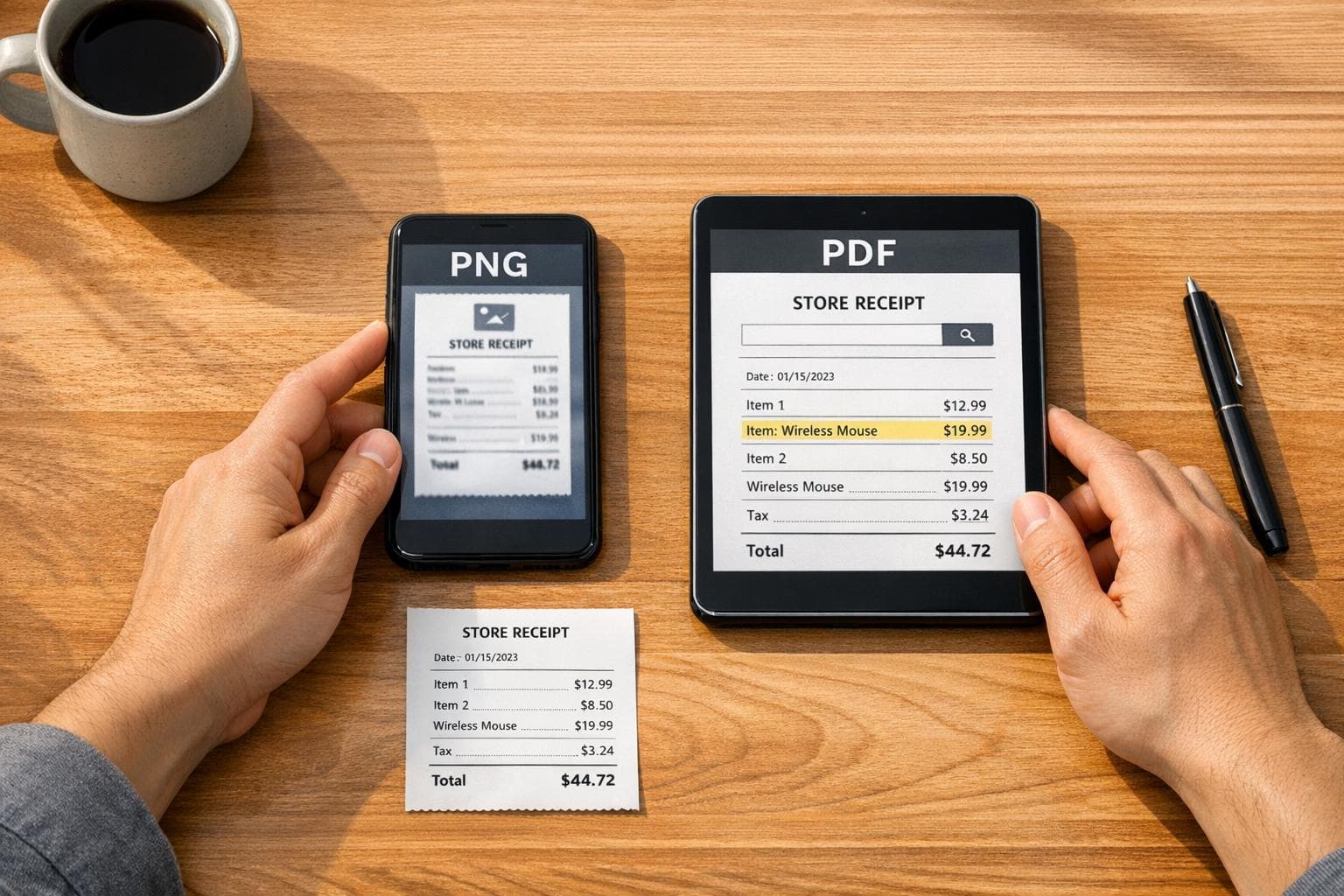
PNG vs PDF Receipts: Best Format for Your Needs
When deciding between PNG and PDF for receipts, it boils down to your specific needs. PNG is great for quick sharing, visual clarity, and embedding in emails or apps. On the other hand, PDF excels in professional documentation, long-term storage, and compliance with tax or audit requirements.
Key Takeaways:
- Choose PNG for single-page, visually sharp receipts you can easily share or embed.
- Opt for PDF when you need searchable text, multi-page support, or secure, archival-quality records.
Quick Comparison:
| Feature | PNG | |
|---|---|---|
| Text Searchability | No (requires OCR) | Yes (native text layer) |
| Multi-Page Support | No | Yes |
| File Size | Smaller (~40 KB) | Larger (~150 KB) |
| Long-Term Storage | Limited | Reliable (PDF/A compliant) |
| Best For | Quick sharing, visual use | Taxes, audits, formal docs |
Bottom Line: Go with PNG for casual, fast use. Use PDF for professional, long-term needs.
PNG and PDF Formats Explained
Before diving into a comparison, let’s break down what each format is designed to do and how they function.
What Is PNG?
PNG (Portable Network Graphics) is a lossless image format, meaning it compresses files without sacrificing any visual quality. Every pixel remains intact, which is why PNG receipts look crisp on screens. It also supports transparency via an alpha channel, making it perfect for embedding in emails, apps, or websites.
However, PNG has its limits. It’s a static image format, so any text within a PNG receipt is essentially "locked" into the image. You can’t select, copy, or search the text unless you use OCR (Optical Character Recognition) software. Additionally, PNG files are restricted to a single page per file.
What Is PDF?
PDF (Portable Document Format) is more than just an image format - it’s a complete document container. PDFs combine text, fonts, layouts, and graphics into a single file that maintains its appearance across all devices and operating systems. One standout feature is its native text layer, which allows for searchable and selectable text. PDFs can also handle multiple pages in one document.
"PDF is the universal standard for sharing documents with consistent formatting across all devices and operating systems." - KaijuConverter
PDFs are also compatible with the PDF/A archival standard (ISO 32000), which is specifically designed for long-term preservation. This feature makes PDFs a favorite for tax authorities and auditors who require reliable, unaltered document storage.
These differences play a significant role in determining which format works best for specific receipt-related tasks.
Why Format Matters for Receipts
Choosing the right format impacts more than just how a receipt looks. It determines whether the file can be easily printed, searched, accepted by expense apps, or withstand scrutiny during audits. Here’s a side-by-side comparison of how PNG and PDF perform in key areas of receipt management:
| Factor | PNG | |
|---|---|---|
| Text searchability | No (requires OCR) | Yes (native text layer) |
| Multi-page support | No (one file per page) | Yes |
| Print quality | Screen-optimized (RGB only) | High (supports vector/fonts) |
| Archival standard | ISO/IEC 15948 | ISO 32000 (PDF/A for archival) |
| Email/web embedding | Native, renders inline | Often appears as an attachment |
| Tax/audit acceptance | Limited | Widely accepted |
For quick, casual sharing - like embedding a receipt in an email or sending it in a chat - PNG is often the go-to. But when it comes to tax documentation, audits, or long-term storage, PDF’s advanced features and compliance make it the better choice.
sbb-itb-2232899
PNG Receipts: Pros, Cons, and Use Cases
Advantages of PNG Receipts
PNG receipts work exceptionally well in digital scenarios. They can be viewed instantly in emails, messaging apps, or social media without needing special software. This makes them a convenient way to share receipts online.
Thanks to PNG's alpha channel, you can include a business logo in the receipt header without any visible background, ensuring a polished and professional appearance.
The Receipt Generator's PNG export feature enhances this further by adding realistic thermal-style fonts, authentic layouts, and paper textures. Plus, the AI Place in Scene tool can simulate a physical receipt on various surfaces, which is a huge time-saver for designers, marketers, or even film production teams.
James T., a film producer, shared his experience:
"We use this receipt generator constantly for set props. The thermal paper texture and real store receipt templates make our scenes look 100% authentic."
Another advantage is how seamlessly PNG receipts integrate with expense management platforms like Expensify and Concur, which are designed to handle image uploads efficiently.
While these benefits make PNG receipts a great option for digital use, there are limitations to consider, depending on your requirements.
Limitations of PNG Receipts
One major drawback of PNG receipts is their lack of native text search. Since text is flattened into pixels, you can't search, copy, or select it without using OCR (optical character recognition).
Another limitation is that PNG files only support single-page formats. If you need to handle multiple receipts, you’ll end up managing several files, which can quickly become cumbersome in a business setting.
Printing PNG receipts also presents challenges. PNG uses the RGB color model, which isn’t compatible with CMYK - commonly used in professional printing. Additionally, scaling issues can arise due to mismatched widths, such as 384px for a 58mm printer versus 576px for an 80mm printer, leading to blurred text.
Lastly, PNG files tend to have larger sizes due to their high color depth and embedded metadata, which could be a concern for storage or sharing.
Best Use Cases for PNG Receipts
Taking these pros and cons into account, here are the best scenarios for using PNG receipts:
- Freelance billing: Quickly send proof-of-payment images to clients via email or messaging platforms.
- Expense app submissions: Upload receipts directly to tools like Expensify or Concur for reimbursement processes.
- Design and media projects: Craft realistic receipt mockups for UI/UX designs, retail app prototypes, or film props.
- Personal record-keeping: Save a single receipt snapshot for budgeting, HSA/FSA reimbursements, or informal documentation.
If you need a sharp, single-page receipt that’s easy to share and looks great on-screen, PNG is a solid choice. However, if your needs include professional printing, long-term storage, or managing multiple receipts in one file, a PDF might serve you better. Up next, we’ll explore PDF receipts and how they compare.
PDF Receipts: Pros, Cons, and Use Cases
Advantages of PDF Receipts
When it comes to official documentation, PDF receipts are the go-to format. They comply with IRS, ESIGN, and UETA standards, making them legally valid and reliable. Plus, their text is both searchable and selectable, which makes it easy to pinpoint specific vendors or amounts. PDFs also support the PDF/A format, ensuring records remain accessible and intact for decades. Importantly, they preserve transaction integrity since altering them isn’t straightforward.
"PDFs are easier to organize, email, and store than loose image files... It is the universal format that every accountant, employer, and government agency accepts." - Alicia Grant, Frontend Engineer
Thanks to the ESIGN Act and UETA (adopted by 49 states as of 2026), digital PDF receipts hold the same legal weight as traditional paper ones. Despite these strong points, PDFs aren’t without their challenges.
Limitations of PDF Receipts
While PDFs shine in compliance and archival reliability, they can be less user-friendly in mobile email presentations and aren’t as efficient in file size. Unlike PNG images, PDFs can’t be embedded directly into an email body. Instead, they appear as attachments with a generic icon, which might make them less noticeable on mobile screens.
Additionally, PDFs are bulkier. A styled PDF receipt typically weighs about 150 KB, compared to just 40 KB for a similar PNG. This difference can impact storage and email deliverability. For example, in 2025, Accreditly switched from attaching PDFs to embedding inline PNG images in order confirmations. This change boosted their mobile open-to-action rates from 14% to 89% and reduced their average email size from 198 KB to 67 KB.
Best Use Cases for PDF Receipts
For tasks like business documentation and long-term record-keeping, PDFs are unmatched in reliability. Here’s a quick look at scenarios where PDFs outperform image formats:
| Scenario | Why PDF Works Best |
|---|---|
| Year-end tax preparation | Searchable text; IRS-compliant; easy to reproduce as hard copies |
| Monthly expense reports | Consolidate multiple receipts into one organized file |
| Business documentation | Non-editable, preserving transaction integrity |
| Long-term archiving | Maintains readability and consistency across systems |
| Audit or litigation support | Speeds up discovery with selectable text across large datasets |
Here’s a handy tip: Use a consistent naming format like "YYYY-MM-DD_Vendor_Amount.pdf" for your receipts. For instance, "2026-05-14_Costco_87.43.pdf" makes them easy to sort chronologically.
PNG vs PDF: Side-by-Side Comparison
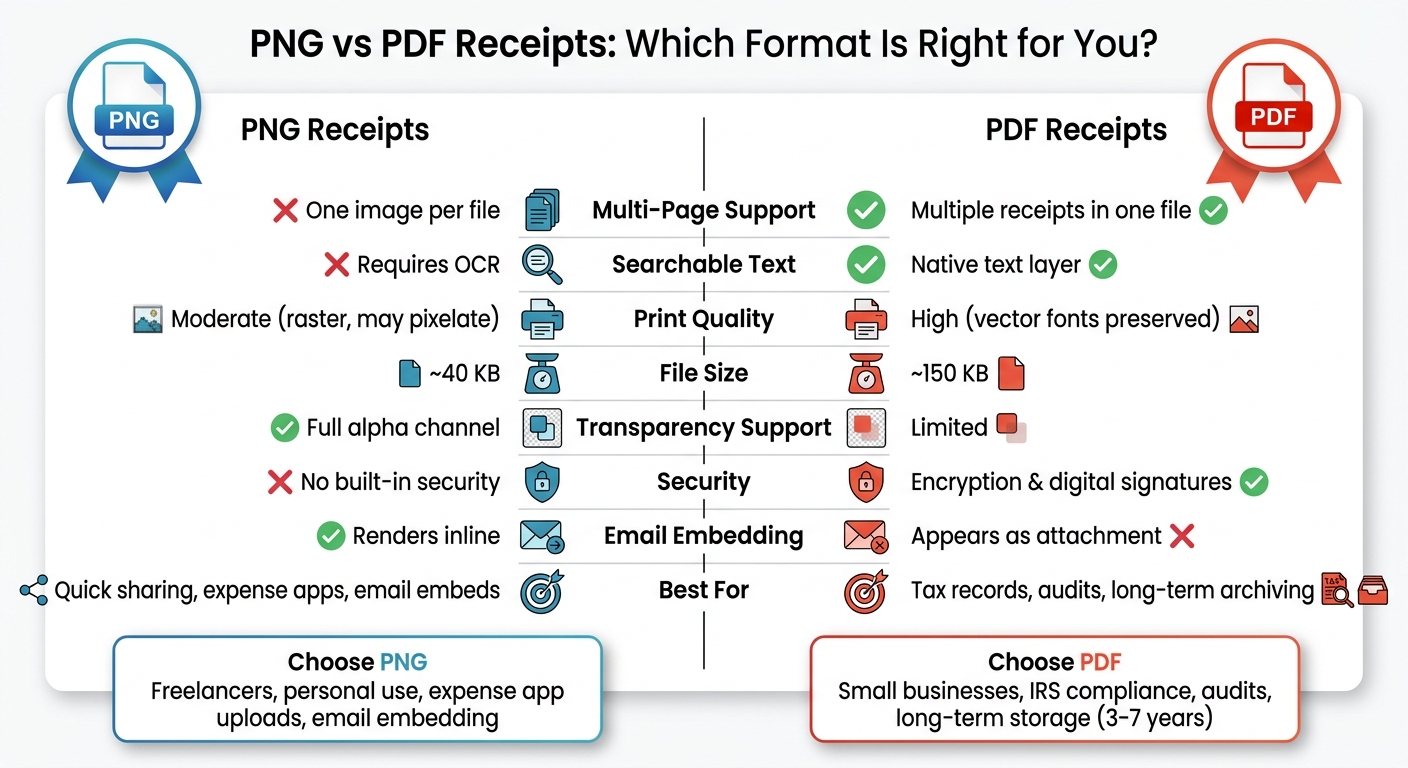
PNG vs PDF Receipts: Full Feature Comparison
Comparison Table
Both PNG and PDF have their strengths, but they serve different purposes. Here's a breakdown of how they compare for managing receipts:
| Feature | PDF - Portable Document Format | PNG - Portable Network Graphics |
|---|---|---|
| Multi-page support | Yes - allows multiple receipts in one file | No - limited to one image per file |
| Searchable text | Yes - includes a searchable text layer | No - requires OCR to extract text |
| Print quality | High - retains fonts and vector graphics | Moderate - raster-based; may pixelate when enlarged |
| File size (single page) | ~150 KB for a styled receipt | ~40 KB for a similar receipt |
| Transparency support | Limited | Fully supports transparency with an alpha channel |
| Device compatibility | Universal but may require a viewer | Opens natively in most apps and browsers |
| Security | Includes encryption and digital signature options | No built-in security features |
| Best for | Tax records, audits, and formal documentation | Quick sharing, email embeds, and app uploads |
These technical differences can help you decide which format works best for your specific tasks.
Which Format Fits Your Role
Now that you know the technical details, let’s explore which format suits different roles and needs.
Freelancers often juggle formal and casual tasks. PDFs are perfect for professional use, like client handovers or filing 1099 forms. On the other hand, PNGs are great for quick communication, especially when you need to share a receipt instantly via messaging apps.
Small business owners should lean toward PDFs for accounting and audits. Given that the IRS requires records to remain legible for 3 to 7 years, PDF/A is an excellent choice for secure, long-term storage. However, when sending order confirmation emails, PNG's smaller size and ability to display inline can enhance customer interaction.
Personal users tracking everyday expenses, reimbursements, or warranties will likely find PNG more convenient. It’s quick to share, works across platforms without extra software, and is easy to screenshot. Receipt Generator exports receipts in high-resolution PNG by default, simplifying personal use and casual sharing.
Conclusion: Choosing the Right Format with Receipt Generator
Deciding between PNG and PDF comes down to how you plan to use the receipt. PNG offers speed, visual clarity, and universal accessibility, while PDF provides structure, searchability, and suitability for official documentation. Neither is inherently better - they simply serve different needs.
When to Export as PNG
PNG works best when you need a quick, visually appealing option. Whether you're uploading a receipt to an expense app, embedding it in an email, or sharing it via WhatsApp, PNG handles these tasks with ease.
Receipt Generator’s default export is a high-resolution PNG, ensuring a professional look. Plus, the AI Place in Scene feature can elevate the presentation by placing your receipt in a realistic setting, like on a wooden desk, marble counter, or beside a product - no printer required. For more formal or official uses, though, PDF may be a better fit.
When to Export as PDF
PDF is ideal for legal documentation and long-term storage. Its selectable text and audit-ready format meet IRS and audit requirements. To keep your files organized, use a consistent naming format, such as Receipt-[Number]-[ClientName]-[Date].pdf. If you need to convert a PNG receipt to PDF, you can quickly use the "Print to PDF" feature available on both Windows and macOS.
FAQs
Will my receipt still be accepted if I submit a PNG instead of a PDF?
Yes, a PNG receipt is usually accepted. PNG files provide clear, high-quality images and are commonly used for sharing documents digitally. While PDFs might be the go-to option for printing or official record-keeping, PNGs work well when an image upload is needed. As long as the receipt includes essential details like the business name, date, and total amount, both formats are generally acceptable for most uses.
How do I make a PNG receipt searchable without retyping it?
To turn a PNG receipt into a searchable file without manually retyping it, you can use Optical Character Recognition (OCR) technology. OCR works by analyzing the image and converting it into editable, searchable text. Simply upload your PNG file to an OCR tool - whether it's software or an online service - and extract the text. The tool can then generate a searchable PDF, allowing you to use shortcuts like Ctrl+F to locate specific details instantly.
What’s the easiest way to combine multiple receipts into one file?
The simplest method is to use an online image-to-PDF converter. These tools allow you to easily drag and drop PNG or JPEG files directly into your browser. You can rearrange the images as needed and then download a single multi-page PDF. This approach eliminates the need to install software, making the process quick and hassle-free. Many of these tools also include helpful features like automatic date detection, grid layouts, and the ability to merge PDFs with images for extra flexibility.